Ranch Life · Equipment
For a long time, the price of a beautiful piece of land at the end of a long county road was a slow internet connection, or none at all. Starlink changed that, and it’s quietly changing who can live on a ranch full-time.
Out here, the internet isn’t a luxury.
It’s how you work from the ranch instead of driving to town. It’s the camera on the barn, the alert from the generator, the call to the vet, the movie on a snowed-in Saturday night.
For a lot of rural land, the best answer today is Starlink. Here’s how it works, what it costs, and how we’d set it up on a ranch.
How Starlink Works
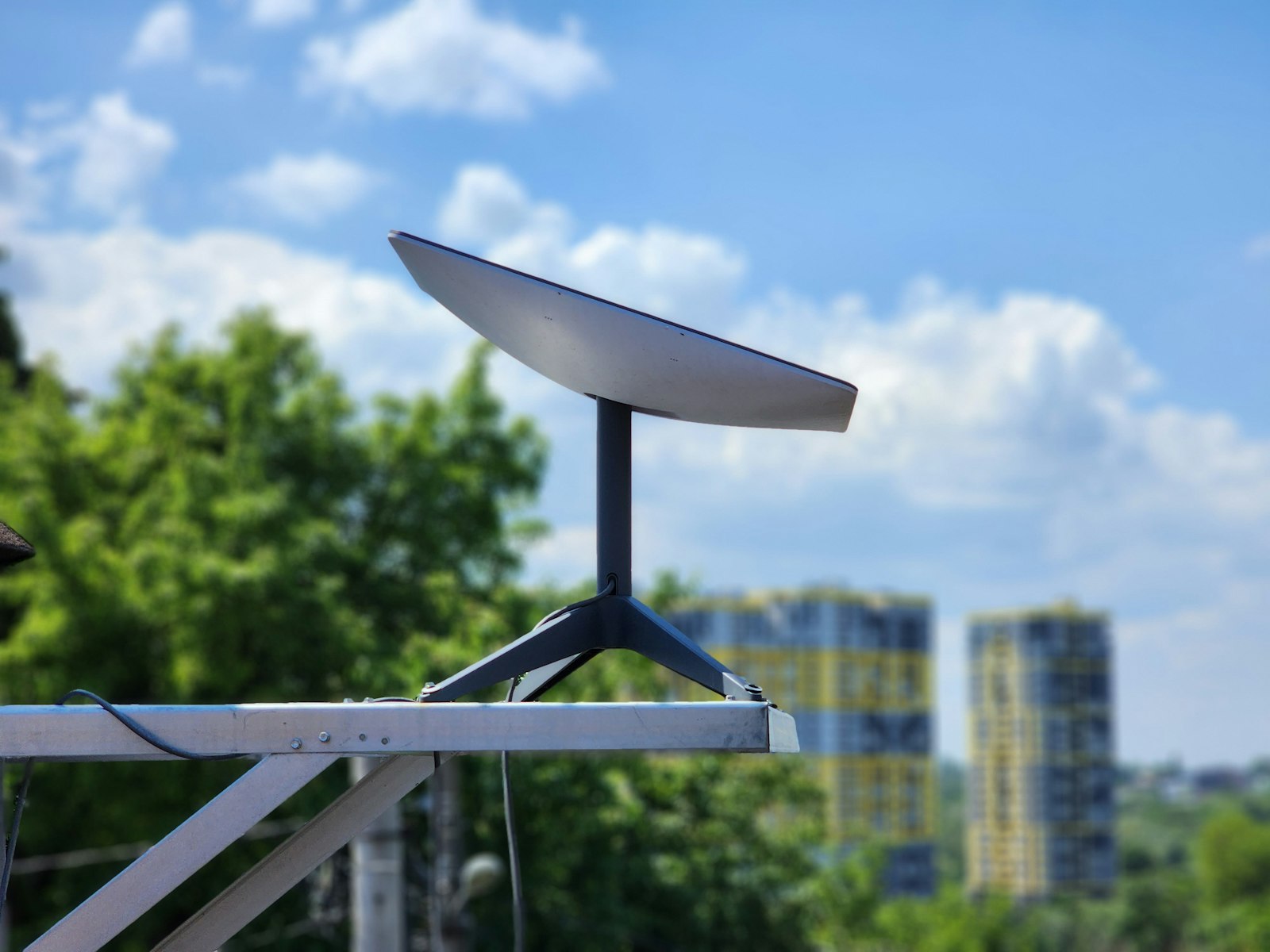
Starlink is satellite internet from SpaceX. Instead of one big satellite far above the earth, it uses thousands of small satellites in low orbit, which is why it’s so much faster and more responsive than the old satellite services.
At home you get a dish (Starlink calls it the kit) and a Wi-Fi router. Point the dish at open sky, plug it in, and the app walks you through the rest. Most families are online the same afternoon.
What It Costs
Starlink’s plans and prices change often, and Starlink now shows pricing only after you enter an address, so what you see may differ. Here’s where U.S. pricing stood in fall 2026, as reported by KeepTrack after Starlink’s June price change:
| Plan | Monthly | Best for |
|---|---|---|
| Residential 100 Mbps | About $55 | One or two people, lighter use |
| Residential 200 Mbps | About $85 | The main ranch house |
| Residential Max | About $130 | A busy household, home offices, lots of streaming |
| Roam | From about $55 | A camper, or a cabin you visit now and then |
| Standby Mode | About $10 | Pausing service on a seasonal place |
The Standard kit has run about $349, with rental offered in some areas, and the smaller Starlink Mini costs less. The cheaper tiers aren’t offered everywhere, especially where the local network is busy. Always check starlink.com with your exact address before you order.
Which Plan for Which Place?
The main house: a Residential plan, so everyone can work, stream and video call without thinking about it. If people work from home, Max gets the most priority on a busy network.
The guest house, bunkhouse or shop: often you don’t need a second dish. Starlink’s mesh Wi-Fi routers can carry the signal to nearby buildings, or you can run a cable or point-to-point wireless link from the house.
A cabin on another property: a Starlink Mini on a Roam plan goes wherever you go, and Standby Mode keeps the account alive for about $10 a month when no one’s there.
Finding the Right Spot for the Dish
The dish needs a wide, clear view of the sky. Starlink’s Standard kit has a field of view of about 100 degrees, so tall pines or a ridge to the north can interrupt it.
Before you mount anything, use the obstruction checker in the Starlink app. It shows you exactly where trees or buildings block the view.
A few placements that work well on a ranch:
- The roof ridge of the house, often the clearest view on the property.
- A pole mount set back from the trees, with the cable run through buried conduit.
- The shop or barn roof, to keep the dish out of sight from the front porch.
Built for Ranch Weather
The Standard kit is made for the kind of weather we get out here. According to Starlink’s specifications:
- It melts snow at up to about 1½ inches an hour.
- It operates from about -22°F to 122°F.
- It keeps working in winds of 50 mph or more.
Heavy, wet snow or a big storm can still interrupt service for a while, so it’s worth keeping a cell signal booster or a backup plan for the most important calls.
If You’re Off the Grid
In a full ranch house, Starlink is a modest load. In a small off-grid cabin, it can be one of the biggest.
Starlink lists the Standard kit at about 50 to 75 watts on average. Left on around the clock, that’s roughly 1.2 to 1.8 kilowatt-hours a day, and more when it’s melting snow. The smaller Mini uses less, which makes it a good match for a solar cabin, and switching the dish off overnight saves even more.
Add it to your list in our off-grid power calculator, and see our guide to powering a cabin with generators and solar.
Starlink vs. the Other Options
Starlink isn’t the only choice, and on some land it isn’t the best one.
- Fiber or cable: if it reaches your road, it’s usually faster and steadier. Lucky you.
- Fixed wireless: a local provider beams internet from a tower. It can be excellent if you have a clear line of sight to their tower.
- 5G home internet: from the big cell carriers, worth a look if you have strong cell service at the house.
- Traditional satellite (HughesNet, Viasat): available nearly everywhere, but the satellites are much farther away, so video calls and gaming feel slower.
For most ranches beyond the reach of cable and cell towers, Starlink is the one that makes full-time ranch life feel connected.
Our Take
If your dream property sits miles down a dirt road, don’t let the internet talk you out of it.
Check Starlink’s availability and pricing for the address before you buy, walk the land with the app’s obstruction checker, and plan a spot for the dish the same way you’d plan the spot for the house: with a wide-open view.
Then pour the coffee, open the laptop on the porch, and get to work with the mountains in front of you.
Planning the rest of the land? Read what to look for when buying ranch land, try our raw land setup calculator, or see how to keep it all running with a whole-house generator.
Prices as reported in fall 2026 and specifications from Starlink; plans, prices and availability vary by address. We’re not affiliated with Starlink.